Speedlink dongle
The Speedlink dongle (model NAYA-100-1) is a small USB-A receiver shipped in the Create's box, built
around its own Nordic nRF52840. This page covers its board and radio, its USB identity, what it does and
does not do with the shipped firmware, its history, and the community replacement stick. The one thing
to know: no shipped firmware gives the dongle a working role; it enumerates, runs its own bootloader,
and answers none of the halves' commands.
At a glance
- FCC ID 2BQ4V0825DG (granted 2025-09-03), ISED 34320-0825DG; board
B0K17_Dongle_20241106_V01. - One nRF52840 (the same lot as the halves' SoCs), a 32 MHz crystal, an RGB LED, a Boen RF0401A antenna.
- Filed radio: one 2 Mbps GFSK mode the lab calls "2.4G SRD", on the Bluetooth LE channel plan; the manual says "Using Bluetooth v5.4"; whether any shipping firmware uses the SRD mode is open.
- USB VID
0x37D1, PID0x012C("Dongle"), after a brief MCUboot identity0x0137. - No NayaFlow release carries a dongle firmware image.
What it is
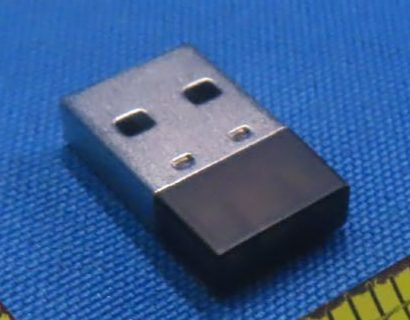
The Speedlink dongle is a small USB-A receiver in the Create's box: model NAYA-100-1(Dongle),
equipment "Wireless dongle", FCC ID 2BQ4V0825DG (granted 2025-09-03), ISED 34320-0825DG (approved
2025-09-08) DOC DG test report p1, p101745. The manual's spec sheet says
"Speedlink Connection: Using Bluetooth v5.4" DOC7. The dongle filing's "user manual" is the
keyboard manual v1.0.6 (byte-identical files); it gives the dongle no pairing procedure and one
troubleshooting line ("Ensure the speedlink dongle is properly seated") DOC1.
History: every 2023 Kickstarter reward tier listed an "RF Receiver" and the FAQ promised "one RF device via the included dongle"; the 2023 feature list said "BLE and RF"; in September 2024 the planned slim USB-C receiver became a USB-A one (a capable USB-C receiver would have been large); tooling for "the receiver dongle" started in 2024-11. No vendor text says a working dongle mode shipped for the Create DOC INFERRED12131516.
The board
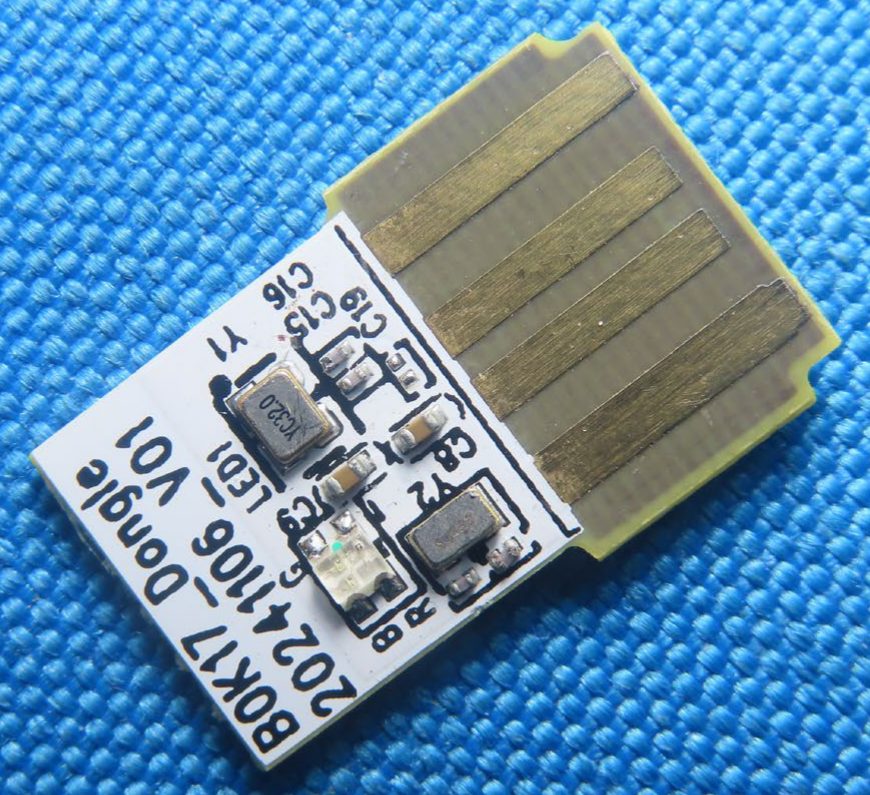
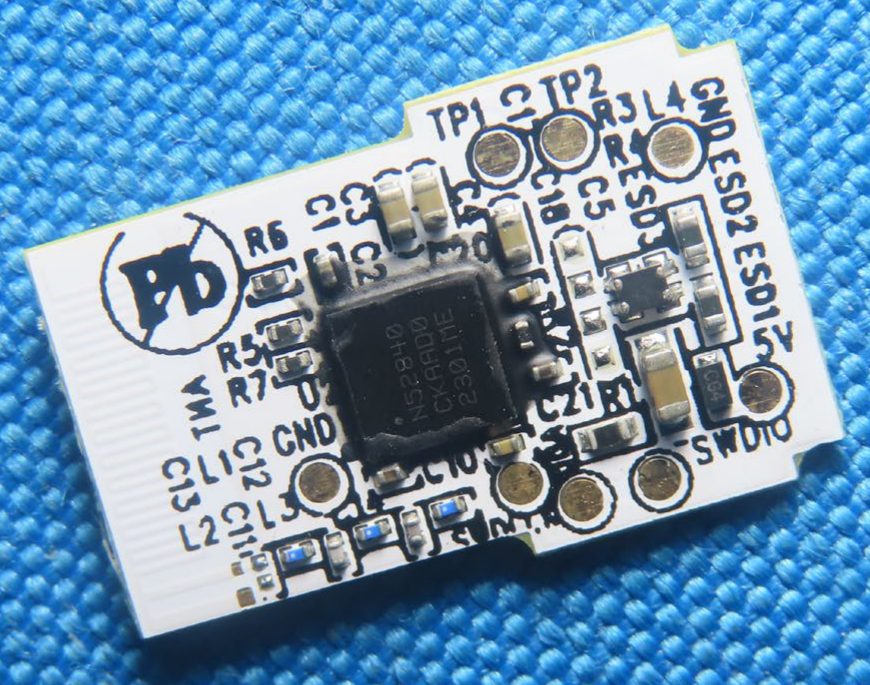
| Item | What the photos show | Evidence |
|---|---|---|
| Board | B0K17_Dongle_20241106_V01 (the second character is the digit zero in the report's text layer), double-sided, about 16.5-18 x 10-11.6 mm (inferred) |
DOC INFERRED DG test report p10; DG IP p4, p5 |
| SoC | Nordic nRF52840 in the CKAA package (WLCSP), marked N52840 / CKAAD0 / 2301ME, fully legible; its firmware lives in the SoC's internal 1 MB flash (no external flash on the board). The lot (2301ME) and build code (D0) match the halves' SoCs |
DOC DG IP p5 |
| Clocks | Y1 32 MHz crystal marked YC32.0 (the same marking as on the halves); Y2 a two-pad part with an illegible lid (32.768 kHz, inferred) |
DOC INFERRED DG IP p5 |
| Status LED | LED1, a 4-pad RGB LED with pads marked G, B, R (one common pad, inferred) |
DOC INFERRED DG IP p4, p5 |
| Antenna | Boen RF0401A, a 10 mm PCB antenna with no connector, at the end opposite the USB fingers under the plastic cap; matching network L1-L3, C11-C13 |
DOC INFERRED DG OTA report p2, p13; DG RF p10; DG IP p5 |
| Test pads (back) | TP1, TP2, two GND, 5V, SWDIO, and two more pads whose label is cut by the board edge (fragment SW…, SWDCLK expected, inferred) |
DOC INFERRED DG IP p5 |
| Other parts | two small ESD parts at the USB end, a 4-lead part labeled ESD3 (an ESD array or a regulator, not determined), a 2-terminal part marked CG4 on the 5 V pad (fuse, diode or TVS, not identified), passives |
DOC INFERRED |
| Not on the board | external flash, a USB bridge chip, a PA or LNA, a battery, a charger; the nRF52840 is the only IC-class part | DOC |
| Enclosure | four gold USB-A fingers in a brushed metal USB-A shell (two latch windows and two dimples on one face) with a dark plastic cap, about 20-21 mm long (estimate); the photographed unit carries no product marking, FCC ID or model text, only a lab tag | DOC INFERRED DG EP p2-p3; DG IP p4-p5; CRR IP7 p44-p45 |
All rows12. The RF0401A as tested by the lab: 0.91, 2.29 and 3.70 dBi at 2400, 2450 and 2500 MHz (the sweep's start, center and end), efficiency 17.8-31.6 %; the filed gain of 3.11 dBi is the measured value at 2480 MHz (28.18 %); measurement uncertainty 1.17 dB. The source is a BTL over-the-air antenna test report (BTL-OTA-1-2506C290, tested 2025-07-14, EMQuest EMQ-100 software, ETS-Lindgren anechoic chamber), not a vendor spec sheet DOC DG OTA report p2, p6-p8, p11; DG RF p101. The dongle has one antenna, at the far end of the cap, and no simultaneous transmission; the internal-photo exhibit's "Antenna" arrow is misplaced DOC DG SAR p22, p27; DG IP p4.
Power, label and RF exposure
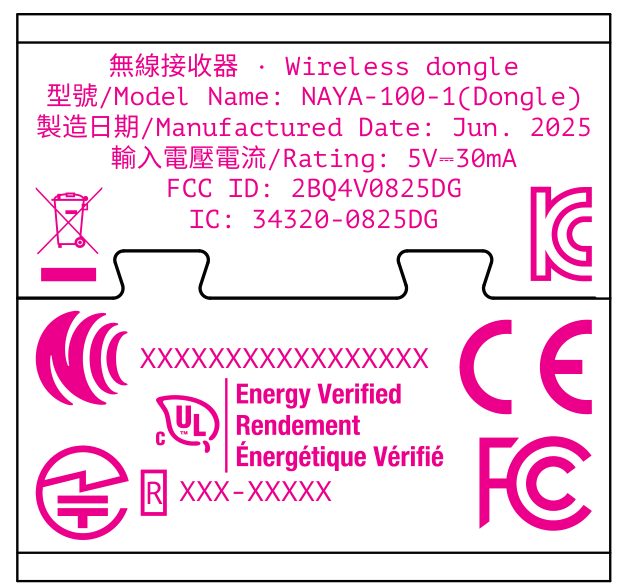
- Power. Bus-powered, "Supplied from USB port", DC 5 V, rated 5 V DC 30 mA on its label artwork; no cell DOC DG RF report p10; DG LBL1.
- Radio as filed. 15.247 DTS, 2402-2480 MHz GFSK, tested at 2 Mbps only, maximum output 8.97 dBm
(7.9 mW); power setting 8, 7, 8 at 2402, 2442, 2480 MHz; lab tool
nrfconnect-setup-5.1.0-x64DOC DG RF report p10, p11 (text layer verified 2026-09-23). The report R00 was issued 2025-08-12; the dongle also appears in the right-half filing's photos (attachment pages 44-47) DOC2. - RF exposure. The SAR report (
BTL-FCC SAR-1-2506C290R00, issued 2025-08-12) tested five USB orientations at 5 mm with 100 % duty; the highest reported 1-g SAR is 0.080 W/kg (2402 MHz, horizontal-down; measured 0.054 scaled to the 8.00 dBm tune-up) against a 1.6 W/kg limit. Average conducted power was 6.28 / 6.60 / 6.71 dBm at 2402 / 2442 / 2480 MHz. The keyboard manual quotes the same 0.08 W/kg and a 5 mm ISED distance DOC DG SAR p1, p7, p22-p2617. - Label. The artwork (dated 2025-07-25, 12.55 x 12.00 mm, sized for one face of the USB-A shell,
inferred) reads "Wireless dongle",
NAYA-100-1(Dongle), "Manufactured Date: Jun. 2025", "Rating: 5V⎓30mA",FCC ID: 2BQ4V0825DG,IC: 34320-0825DG; the marks are WEEE, KC (no number), an NCC-style placeholder, c-UL Energy Verified, a Japanese Giteki mark with anXXX-XXXXXplaceholder, CE and FCC. It has no UKCA, RCM, VCCI, BSMI or N-in-ellipse mark and no address, serial-number field or Part 15 text. The photographed sample carries no engraving DOC INFERRED DG LBL; DG EP p2. See Regulatory records.
Is it Bluetooth?
The manual says "Speedlink Connection: Using Bluetooth v5.4", and the vendor's NayaFlow 0.1.0 note reserved a host slot "for future BLE dongle support" DOC79. The dongle's RF and SAR reports, however, test only a 2 Mbps GFSK mode that the SAR report calls "2.4G SRD", and neither report says "BLE" or "Bluetooth" DOC1. That mode sits on the Bluetooth LE channel plan (data channels 0-36 at 2404-2478 MHz, advertising channels 37-39 at 2402, 2426 and 2480 MHz; test modes "TX Mode_2Mbps Channel 37/19/39") with the bandwidth of LE 2M (6 dB 1.124-1.192 MHz, 99 % 2.040-2.048 MHz) DOC DG RF report p10-p11, p53. Both halves' FCC filings carry a separate "2.4G SRD" 2 Mbps test report besides BLE, in reports of the same format DOC32. The keyboard's SIG listing describes "USB, 2.4G, BLE three working modes", and the vendor explored Nordic's LLPM low-latency mode in 2023 DOC614. So the filings do not settle whether the dongle speaks plain Bluetooth INFERRED: the signal cannot be told from LE 2M, but whether the link protocol is standard BLE or a vendor mode on the same radio cannot be decided from them, for the dongle or the halves. Whether shipping firmware ever uses the SRD mode, on the halves or the dongle, is OPEN; no shipped firmware activates the dongle, so there is nothing of the dongle's to sniff (details).
USB identity and behavior
- Identity. VID
0x37D1, PID0x012C, product string "Dongle",bcdDevice 0x0307, composite class0xEF/0x02/0x01with a CDC control and a CDC data interface MEASURED (owner's dongle, 2026-09-11; dongle firmware not recorded). - Bootloader. On every plug-in the dongle first shows a transient identity
0x0137(the application PID plus0x0B, the same offset as the halves' bootloader PIDs) before0x012C. That identity's configuration descriptor is byte-identical to the halves' MCUboot identities (141 bytes, four interfaces, two CDC-ACM functions), so the dongle runs MCUboot MEASURED (owner's dongle and boards, USB capture, 2026-09-11); NayaCore also declares anMCUBootWorker_DongleSTATIC8 (also reported by createflow-dongle). The application appeared about 6 s after the bootloader identity, where the halves take 1.4-1.9 s MEASURED. A third party reports that the dongle's MCUboot uses a vendor key and has no serial-recovery window REPORTED11; with no dongle image anywhere, the key cannot be checked. See Bootloader. - No answer to the halves' protocol. Its CDC port does not answer the halves' handshake (
fe/1001andfe/1002sent todst 0x50, the address NayaCore uses for a dongle); instead it streams ASCII dots (2e: a burst of about 1 040 when the port opens, then 3 every 200 ms) MEASURED STATIC (owner's dongle, 2026-09-11)8. A third party reports that it speaks the same frame format but answers on no known address REPORTED11; other addresses are untested by us. - LED and hubs. Its LED showed green and red during the transient identity and then settled white; plugged into a USB hub or dock it got power but did not enumerate. Both observations come from one session and should be re-checked MEASURED (2026-09-11). The manual describes no dongle LED behavior at all DOC7.
- Case. Its metal case is glued or crimped and did not come off without damage (third party) REPORTED11; the FCC photos show only the assembled plug and the bare board, so this cannot be checked from the filings.
- Version. The only version-like value is
bcdDevice 0x0307. The halves' bootloader identities report the same value (their applications report0x0300), so it most likely reflects the USB stack's default (Zephyr 3.7) rather than a dongle firmware version MEASURED INFERRED.
The USB identities of all Naya devices are on USB.
What the software knows about it
- No image. NayaFlow 1.25.1 and 1.21.0 contain dongle code but no dongle firmware image. NayaCore
6.11.0 has a
Naya_DeviceDongleclass, "New Naya Dongle device %1 found at port %2", a GET DONGLE ADDR handler and four dongle worker names, while its only embedded images are the four keyboard images and the module bundle. The NayaCore of 1.21.0 adds symbols that tie the dongle to the left half's Bluetooth address (Naya_DeviceDongle::setLeftKeyboardMacAddress,Naya_DeviceCreateLeft::setDongleMacAddress) and a small dongle command set (restart, release toggle) STATIC8 (also reported by createflow-dongle11). - Vendor notes. NayaFlow 0.1.0 made slots 1-4 user-assignable and reserved slot 5 "for future BLE dongle support"; NayaCore 5.8.1 fixed "Dongle could cause Core to get stuck on some machines"; NayaCore 6.11.0 fixed a crash on dongle connection and centralized dongle version requirements DOC9. No release note through 1.25.1 enables the dongle DOC.
- Relayed statements. Via a third party: in early 2026 the dongle was "not yet active" and would be "enabled in a future firmware update"; the product page listed "RF (coming soon)" REPORTED11. None of these words is in a primary source we hold; the substance agrees with the vendor's own notes.
- A dongle slot in the keyboard. The keyboard's Bluetooth status has five profiles, and profile 0 is not offered by the stock keys (most likely the dongle's, inferred); a "get dongle address" command exists on 3.41.0 but not on 3.28.7. Whether the stored dongle address belongs to the shipped dongle is not known MEASURED STATIC INFERRED (owner's board, 3.41.0, 2026-09-10; a second board, 3.28.7, 2026-09-19)8. See Bluetooth.
- No SIG listing. No Bluetooth SIG listing exists for the dongle (searched 2026-09-23) DOC6.
d_fw.bin. Early NayaFlow releases (0.1.0 to 1.6.10) shipped a separate MCUboot imaged_fw.binin a slot half the size of the keyboard's; whether it was dial or dongle firmware is unknown STATIC10 (details).
The community replacement: createflow-dongle
A community project, createflow-dongle (Apache-2.0), turns an nRF52840 USB stick into a
Bluetooth-to-USB HID bridge for the Create: it pairs on a normal host slot and presents the keyboard's
own HID report map to the host. It enumerates as VID 0x1915 PID 0x520F ("createflow Dongle"), so it
is easy to tell from the stock dongle DOC11. See Tools.
Safety
Do not try to activate the stock dongle
Do not try to reflash or open the stock dongle to "activate" it: it is glued (third party), its bootloader takes only vendor-signed images (third party), and no image exists. Untested by us.
Open questions
- OPEN What the stock dongle does with a keyboard, if anything; what its port speaks (details).
- OPEN Whether the keyboard's stored dongle address is this dongle's (details).
- OPEN
d_fw.bin: dial or dongle firmware (details). - OPEN What the SIG listing's "2.4G" mode refers to (details).
- OPEN
ESD3andCG4part identities (details). - OPEN Whether shipping firmware ever uses the "2.4G SRD" mode, on the dongle or the halves, and whether that mode is BLE (details).
- OPEN Whether its MCUboot has a serial-recovery window, and which addresses its port answers.
Sources
-
FCC ID 2BQ4V0825DG (Speedlink dongle): exhibits on the FCC record (FCC EAS search, grantee 2BQ4V; mirror fccid.io/2BQ4V0825DG). Codes are explained on Regulatory records. ↩↩↩↩↩↩↩
-
FCC ID 2BQ4V0825CRR (right half; its internal photos include the dongle); mirror fccid.io/2BQ4V0825CRR. ↩↩↩
-
FCC ID 2BQ4V0825CRL (left half); mirror fccid.io/2BQ4V0825CRL. ↩
-
FCC OET Equipment Authorization System, grantee search for grantee code 2BQ4V, read 2026-09-23. ↩
-
ISED Canada Radio Equipment List, company number 34320 (search), read 2026-09-23. ↩
-
Bluetooth SIG qualification listings (listing search), searched 2026-09-23. ↩↩
-
Naya Create User Manual Version 1.0.6, FCC ID 2BQ4V0825CRR user manual exhibits (fccid.io); see Manuals. ↩↩↩↩↩
-
NayaFlow 1.25.1 (Windows): NayaCore 6.11.0 strings, symbols and embedded resources; the macOS NayaCore of NayaFlow 1.21.0 (static reading). ↩↩↩↩
-
Vendor release notes, NayaTech/NayaFlow-releases (0.1.0, 1.15.0, 1.25.0). ↩↩
-
create-legacy-firmware,
FIRMWARE-HISTORY.md(image catalog of the 25 stable releases). ↩ -
createflow-dongle, github.com/mediaandmerch/createflow-dongle: README and
docs/findings.md(third party; read at e95b679, 2026-09-23). ↩↩↩↩↩↩ -
Kickstarter campaign page and FAQ, naya-create/naya-create (2023). ↩
-
Kickstarter update 2, 2023-06-07. ↩
-
Kickstarter update 7, 2023-11-07. ↩
-
Kickstarter update 15, 2024-09-03. ↩
-
Kickstarter update 17, 2024-11-04. ↩